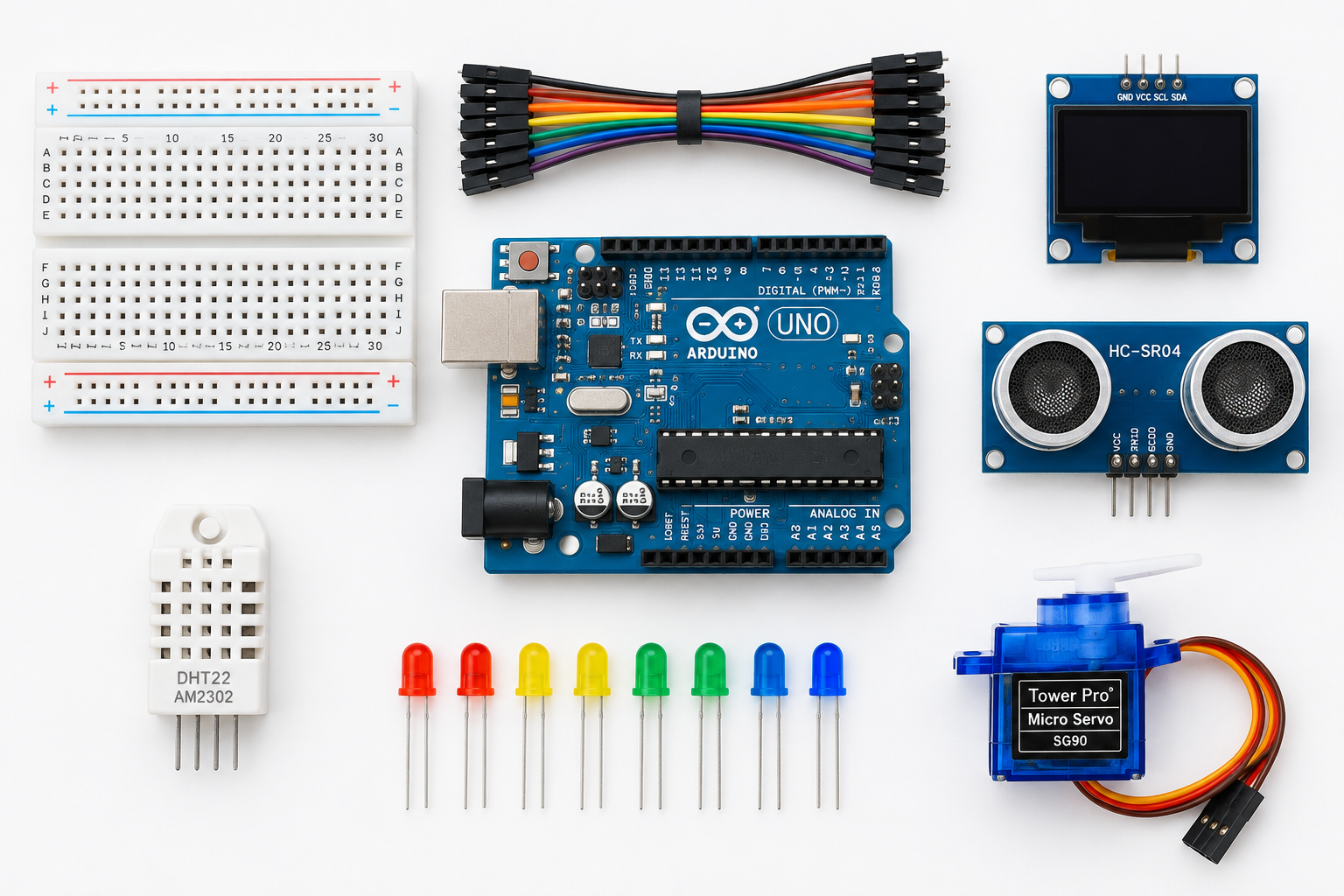
The best Arduino projects for most people are a reaction-time game, an ultrasonic parking sensor, an OLED weather station, a Wi-Fi sensor dashboard and an obstacle-avoiding robot car, because each one teaches a skill the next build reuses. Below you will find 26 project ideas grouped by difficulty and theme, with the parts you need, the board limits that decide what is realistic, and one complete build with wiring and code you can finish tonight.
Pick the board before you pick the project
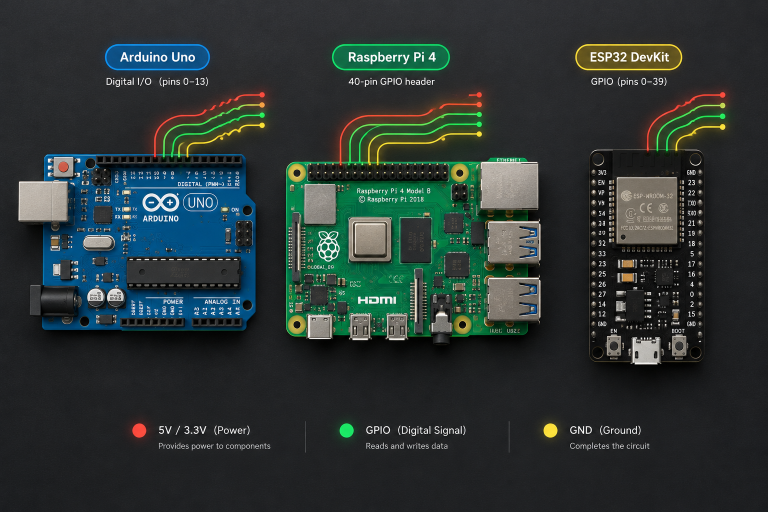
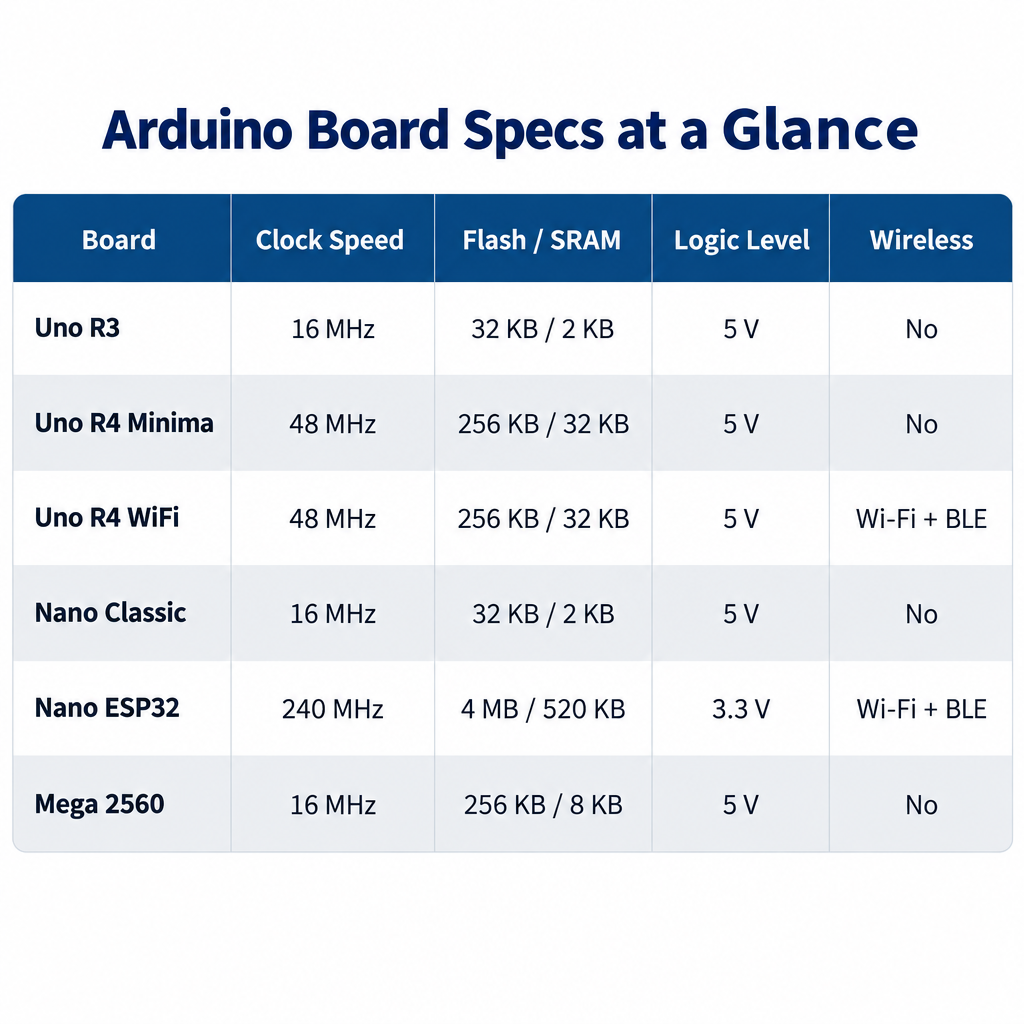
Most “arduino project ideas” lists skip the question that actually decides whether a build succeeds, which is whether your board has enough memory, pins and connectivity for it. The classic Uno R3 still handles every beginner project here, but anything involving Wi-Fi, large displays or long data logs runs more comfortably on a newer board. The specs below come from Arduino’s official hardware documentation.
| Board | Microcontroller | Clock | Flash / SRAM | Logic level | Wireless |
|---|---|---|---|---|---|
| Uno R3 | ATmega328P (8-bit) | 16 MHz | 32 KB / 2 KB | 5 V | None |
| Uno R4 Minima | Renesas RA4M1 (Arm Cortex-M4) | 48 MHz | 256 KB / 32 KB | 5 V | None |
| Uno R4 WiFi | Renesas RA4M1 plus ESP32-S3 module | 48 MHz | 256 KB / 32 KB | 5 V | Wi-Fi, Bluetooth LE |
| Nano (classic) | ATmega328P | 16 MHz | 32 KB / 2 KB | 5 V | None |
| Nano ESP32 | ESP32-S3 | 240 MHz | 16 MB (external) / 512 KB | 3.3 V | Wi-Fi, Bluetooth LE |
| Mega 2560 Rev3 | ATmega2560 | 16 MHz | 256 KB / 8 KB | 5 V | None |
The Uno R4 WiFi also carries a built-in 12×8 red LED matrix, which makes several of the display projects below possible with zero extra wiring. The Mega 2560 earns its place when you need lots of pins (54 digital I/O, 16 analog inputs), as in robot arms with many servos or 3D printer controllers. Prices on the official store change often enough that we have not listed them here; check current pricing before you order, and expect clones of the R3 and classic Nano to cost noticeably less than genuine boards.
Maker tip
If a project needs both a 3.3 V sensor and a 5 V board, buy a bidirectional logic level shifter in the same order so you are not stalled waiting for a second package.
The parts that cover most of these builds
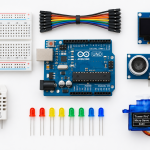
You do not need a giant kit. A small set of sensors, displays and actuators covers almost every idea in this list, and knowing their real limits saves you from building something the part cannot do. The figures below are the commonly published datasheet values for each module.
| Part | What it does | Key published spec | Projects that use it |
|---|---|---|---|
| HC-SR04 ultrasonic sensor | Measures distance with 40 kHz sound pulses | About 2 cm to 400 cm range, 5 V supply | Parking sensor, robot car, tank level |
| DHT11 | Temperature and humidity | 0 to 50 °C (±2 °C), 20 to 90% RH (±5%) | Simple weather station |
| DHT22 (AM2302) | Temperature and humidity | -40 to 80 °C (±0.5 °C), 0 to 100% RH | Better weather station, greenhouse |
| BME280 | Temperature, humidity and pressure over I2C | -40 to 85 °C, pressure accuracy about ±1 hPa | Weather station, altimeter |
| SSD1306 OLED, 128×64 | Small monochrome I2C display | Usual I2C address 0x3C | Weather station, dice, menus |
| MPU-6050 | 3-axis accelerometer and gyroscope | I2C, 3.3 V core (most breakouts accept 5 V) | Balancing robot, motion logger |
| WS2812B LEDs | Individually addressable RGB pixels | Up to about 60 mA per pixel at full white | Lamps, games, clocks |
| SG90 micro servo | Positions a horn to an angle | Roughly 180° travel, 4.8 to 6 V | Robot arm, pan-tilt, locks |
For the DHT sensors, choose the DHT22 unless cost is critical; the DHT11’s ±2 °C error is large enough that you will notice it on a room thermometer.
Beginner Arduino projects for your first weeks
These first builds use a breadboard, a handful of components and the libraries that ship with the Arduino IDE. Each one introduces a single core concept so that by the end you are comfortable with digital outputs, analog inputs, timing and serial debugging.
- Traffic light sequencer. Three LEDs with 220 Ω resistors on digital pins teach you
digitalWrite()and timing, and adding a pedestrian push button introducesINPUT_PULLUPand debouncing. - Reaction-time game. An LED lights after a random delay and you hit a button as fast as you can;
millis()measures your reaction and prints it to the Serial Monitor. Two buttons turn it into a head-to-head duel. - Ultrasonic parking sensor. An HC-SR04 and a passive buzzer beep faster as an object gets closer. This is the full build below.
- Automatic night light. A light-dependent resistor in a voltage divider feeds
analogRead(), and the sketch fades an LED with PWM when the room darkens. It is the cleanest introduction to analog input you will find. - Electronic dice. Press a button and an SSD1306 OLED draws one to six pips. You learn the Adafruit SSD1306 and Adafruit GFX libraries, plus why
random()needsrandomSeed()from a floating analog pin. - Plant soil moisture alarm. A capacitive soil sensor triggers an LED or buzzer when the pot dries out. Skip the cheap two-prong resistive probes, which corrode within weeks of constant use.
Full build: an ultrasonic parking sensor
This is the project we hand to anyone who has blinked an LED and wants something that feels useful. It works on an Uno R3, Uno R4 Minima or Uno R4 WiFi without changes, and it takes about an hour including testing against a wall.
Parts
| Part | Quantity | Notes |
|---|---|---|
| Arduino Uno R3 or R4 | 1 | Any 5 V Uno works |
| HC-SR04 ultrasonic sensor | 1 | 5 V module |
| Passive piezo buzzer | 1 | Must be passive so tone() can set the pitch |
| 100 Ω resistor | 1 | Limits buzzer current |
| Breadboard and jumper wires | 1 set | Male-to-male |
Wiring
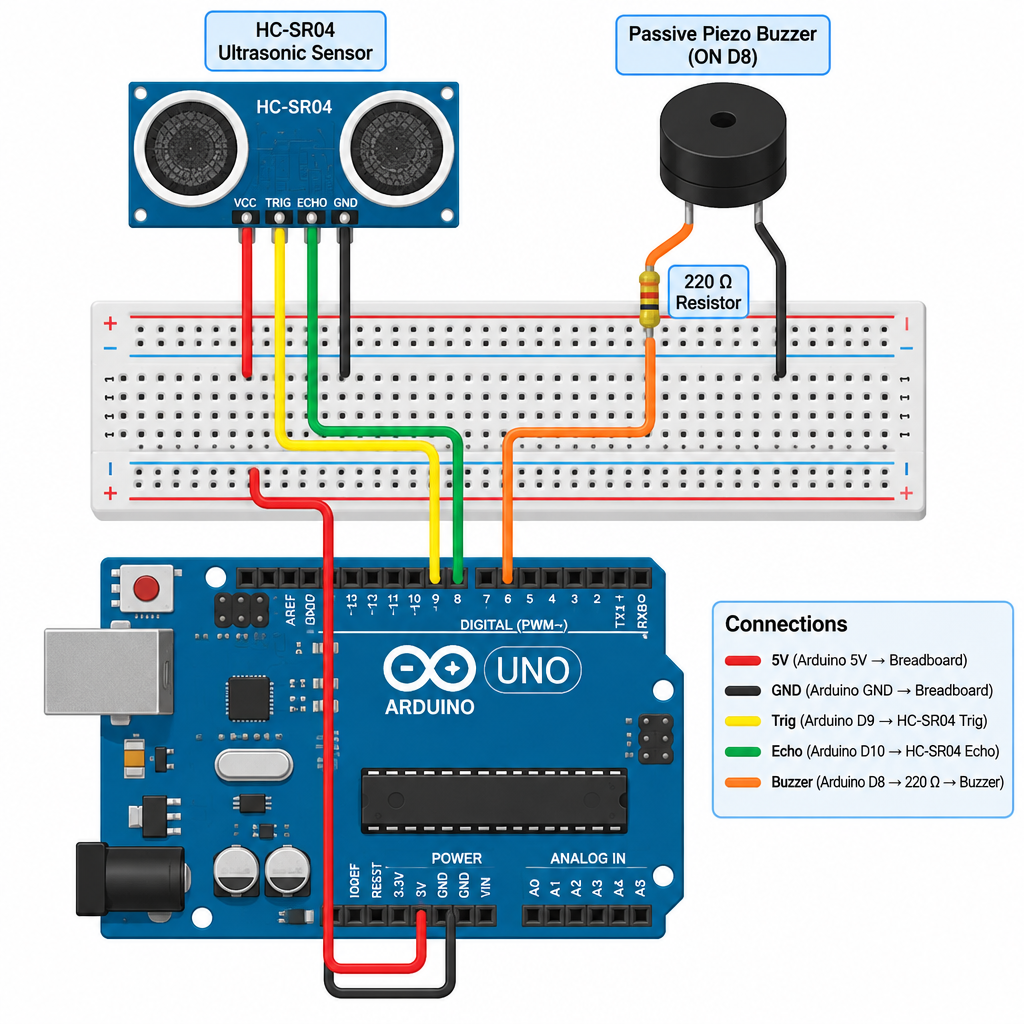
| From | To | Wire purpose |
|---|---|---|
| HC-SR04 VCC | Uno 5V | Sensor power |
| HC-SR04 GND | Uno GND | Common ground |
| HC-SR04 Trig | Uno D9 | Trigger pulse out |
| HC-SR04 Echo | Uno D10 | Echo pulse in |
| Buzzer + (through 100 Ω) | Uno D8 | Tone output |
| Buzzer − | Uno GND | Buzzer return |
The onboard LED on pin 13 flashes along with the beeps, so no extra LED is required.
Power check
The HC-SR04 Echo pin outputs 5 V. On a 3.3 V board such as the Nano ESP32, add a voltage divider (for example 1 kΩ and 2 kΩ) on Echo or you risk damaging the input.
Code
// Ultrasonic parking sensor for Arduino Uno R3 / R4
const int TRIG_PIN   = 9;
const int ECHO_PIN   = 10;
const int BUZZER_PIN = 8;
const int LED_PIN    = 13;

const long ALERT_CM = 100;   // start beeping inside 1 m

void setup() {
  pinMode(TRIG_PIN, OUTPUT);
  pinMode(ECHO_PIN, INPUT);
  pinMode(BUZZER_PIN, OUTPUT);
  pinMode(LED_PIN, OUTPUT);
  Serial.begin(9600);
}

long readDistanceCm() {
  digitalWrite(TRIG_PIN, LOW);
  delayMicroseconds(2);
  digitalWrite(TRIG_PIN, HIGH);
  delayMicroseconds(10);
  digitalWrite(TRIG_PIN, LOW);

  unsigned long duration = pulseIn(ECHO_PIN, HIGH, 30000UL); // 30 ms timeout
  if (duration == 0) {
    return -1;  // no echo received
  }
  return (long)(duration / 58UL);  // about 58 us per cm, round trip
}

void loop() {
  long cm = readDistanceCm();
  Serial.print("Distance: ");
  Serial.print(cm);
  Serial.println(" cm");

  if (cm > 0 && cm < ALERT_CM) {
    long pause = map(cm, 2, ALERT_CM, 40, 600);
    pause = constrain(pause, 40, 600);
    tone(BUZZER_PIN, 2000, 50);
    digitalWrite(LED_PIN, HIGH);
    delay(50);
    digitalWrite(LED_PIN, LOW);
    delay(pause);
  } else {
    noTone(BUZZER_PIN);
    digitalWrite(LED_PIN, LOW);
    delay(100);
  }
}
Build steps
- Wire the HC-SR04 and buzzer using the table above.
- Paste the sketch into Arduino IDE 2 and select your Uno board.
- Upload, then open Serial Monitor at 9600 baud.
- Move your hand toward the sensor and confirm the readings fall.
- Adjust ALERT_CM to suit your garage or desk.
How it works
The sketch sends a 10 µs pulse on Trig, which makes the module emit a burst of ultrasound and hold Echo high until the reflection returns. Sound travels roughly 0.034 cm per microsecond, and because the pulse covers the distance twice, dividing the echo time by about 58 gives centimetres. The map() call converts distance into a pause between beeps, so closer objects produce faster beeping, exactly like a car’s reversing sensor.
Troubleshooting
If every reading is -1, the sensor is not receiving an echo; check that Trig and Echo are not swapped and that nothing soft, such as a curtain, is absorbing the sound. Readings that jump wildly usually mean a loose ground wire or a target angled away from the sensor. On the Uno R3, tone() uses Timer2, so PWM on pins 3 and 11 stops working while a tone plays, which matters later if you add a fading LED.
Sensing, monitoring and display projects
Once you can read a sensor and print the result, the next step is putting data somewhere useful: on a display, on an SD card or onto a network. These builds introduce I2C, SPI and longer-running sketches that have to behave for days rather than minutes.
- OLED weather station. A BME280 and an SSD1306 share the same two I2C wires (A4 and A5 on the Uno R3, or the dedicated SDA/SCL header). Display temperature, humidity and pressure, then add a falling-pressure warning as a crude storm forecast.
- Indoor CO₂ monitor. True NDIR sensors such as Sensirion’s SCD40 series or the MH-Z19 measure carbon dioxide directly; avoid cheap “eCO₂” gas sensors that estimate it from VOCs. A three-colour LED makes ventilation advice obvious at a glance.
- SD card data logger. Log temperature or light levels to a microSD module over SPI with a DS3231 real-time clock for timestamps, then open the CSV in a spreadsheet. On the Uno R3, the SD library alone consumes a large share of the 2 KB of SRAM, so keep the rest of the sketch lean.
- DC power meter. An INA219 breakout measures bus voltage and current on low-voltage DC circuits (its bus voltage limit is 26 V), so you can profile how much a battery-powered project really draws.
- Mailbox or door notifier. A reed switch and magnet detect the lid opening. Paired with a Wi-Fi board from the next section, it can push a phone notification.
Wi-Fi, IoT and home automation projects
Arduino-based home automation used to mean bolting a separate Wi-Fi shield onto an Uno. The Uno R4 WiFi and Nano ESP32 now include wireless on the board, and both work with Arduino Cloud for dashboards and remote control from a phone.
- Cloud sensor dashboard. Put the weather station from idea 7 on an Uno R4 WiFi and publish readings to Arduino Cloud, where you build gauges and history charts without writing web code.
- Low-voltage smart switch. Control 12 V LED strips or a fan through a MOSFET module from your phone. Keep this to low-voltage DC loads.
- ESP32 web server control panel. The Nano ESP32 can host a small web page on your network with buttons that toggle pins and show sensor values, all programmed from the Arduino IDE.
- Internet clock on the R4 matrix. Fetch the time over NTP and scroll it across the Uno R4 WiFi’s built-in 12×8 LED matrix using the Arduino_LED_Matrix library that ships with the board package.
Power check
Switching mains appliances with relay modules puts lethal voltage on your bench. Do not wire mains-powered loads yourself; use certified smart plugs or have a qualified electrician do the installation.
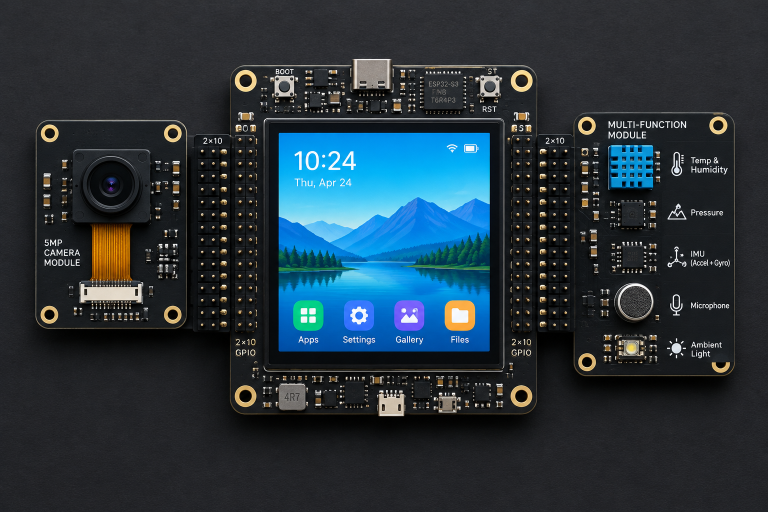
ESP32 boards with integrated touchscreens open up even more options. Our “cyd privacy and camera scanner” build shows what a cheap ESP32 display board can do when you write the firmware yourself, and it is a good next step once idea 14 feels easy.
Robotics projects
Robotics is where many builders discover how much power management matters, because motors pull far more current than any microcontroller pin can supply. Every robot here needs a motor driver and a separate battery supply for the motors.
- Obstacle-avoiding car. A two-wheel chassis, an HC-SR04 on a servo and a motor driver. The TB6612FNG wastes far less power as heat than the older L298N, which drops roughly 2 V across its transistors, so your batteries last longer.
- Line follower. An array of infrared reflectance sensors (TCRT5000 modules or a Pololu QTR array) tracks black tape on a white floor. Upgrade from simple if/else steering to a PID loop and lap times drop sharply.
- Four-axis robot arm. Drive four or more servos through a PCA9685 16-channel PWM board over I2C so the Arduino is not generating every pulse itself, and power the servos from a dedicated 5 V supply.
- Self-balancing robot. An MPU-6050 reads tilt, and a PID controller drives the wheels to stay upright. It is one of the hardest projects here, and tuning the three PID constants teaches more about control systems than any textbook chapter.
Gaming and fun Arduino projects
Fun projects are where many people get hooked, and plenty of the amazing projects with Arduino you see shared online are small games and toys. They are also excellent practice for writing state machines and reading multiple inputs at once.
- Snake on an LED matrix. An 8×8 matrix driven by a MAX7219 chip plus a two-axis joystick module gives you a complete handheld game in about 150 lines of code.
- Custom game controller or macro pad. Boards with native USB, such as the Leonardo, Micro and the Uno R4 boards, can appear to your computer as a keyboard or mouse using the Keyboard and Mouse libraries. The Uno R3 cannot do this out of the box.
- Simon memory game. Four coloured buttons, four LEDs and a buzzer, with each round adding one step to the sequence. Store the high score in EEPROM so it survives a power cycle.
- USB MIDI controller. Potentiometers and buttons become knobs and pads in your music software using the MIDIUSB library on a native-USB board.
Advanced and industrial-style builds
These projects borrow techniques from industrial automation and machine design. They reward patience and careful wiring, and they are where an Arduino starts feeling like real equipment.
- RS-485 Modbus sensor network. MAX485 transceiver modules let several Arduinos share one twisted pair over long cable runs, speaking Modbus RTU, the same protocol used by factory sensors and PLCs.
- GRBL pen plotter or small CNC. GRBL is open-source motion-control firmware that runs on the ATmega328P, so an Uno with a CNC shield and stepper drivers can run a pen plotter or laser engraver from G-code.
- Tank or water-level monitor. An ultrasonic or waterproof JSN-SR04T sensor reports fill level to a display or the cloud. For proper industrial installations, Arduino’s Pro line includes the Opta, a micro PLC designed for that environment.
Power limits that decide which ideas will work
The most common reason a promising build fails is power, not code. Before you wire any of the projects above, check your total current against these limits.
| Limit or load | Published value | What it means for your build |
|---|---|---|
| ATmega328P per I/O pin (Uno R3) | 20 mA recommended, 40 mA absolute max | Fine for an LED, never for a motor or relay coil |
| ATmega328P total across all pins | 200 mA | Many LEDs at once can exceed it |
| Uno R3 3.3V pin | 50 mA | Too weak for most Wi-Fi modules |
| Uno R4 per I/O pin | 8 mA | Lower than the R3; use transistors sooner |
| USB 2.0 port supply | 500 mA | Shared by the board and everything on its 5V pin |
| WS2812B pixel at full white | About 60 mA | A 30-LED strip can draw 1.8 A |
| HC-SR04 working current | About 15 mA | Safe on the board’s 5V pin |
The Uno R4’s 8 mA per-pin figure surprises a lot of people moving up from the R3, so check it before you reuse an old LED circuit with a small resistor.
How to grow an idea into a finished project
A breadboard demo and a finished project are different things, and this gap is where most builds stall. Use this sequence to get from idea to something on a shelf.
- Simulate first. Wokwi runs Uno, Mega, Nano and ESP32 sketches in a browser, including common sensors and displays, so you can test logic before you buy parts.
- Prototype one subsystem at a time. Get the sensor printing to Serial, then add the display, then add Wi-Fi. Combining everything at once makes faults almost impossible to isolate.
- Watch your memory. The IDE reports flash and SRAM use after every compile. On an Uno R3, wrap fixed text in
F("...")to keep strings out of SRAM once you pass about 75% usage. - Move to permanent wiring. Transfer the circuit to stripboard or a custom PCB, and use JST or screw terminals for anything that might be unplugged.
- Design the enclosure around the parts. Measure modules with calipers, leave space for cable strain relief, and remember ultrasonic and gas sensors need open air.
Sometimes the right answer is a different platform. If your idea needs a camera, a full Linux desktop or heavy image processing, look at our guide to “raspberry pi projects“, since an 8-bit microcontroller with 2 KB of RAM simply cannot handle video.
FAQ
Is there an Arduino simulator?
Yes. Wokwi is a free browser-based simulator that supports Uno, Mega, Nano, ESP32 and Raspberry Pi Pico boards, along with many common sensors, displays and LED strips. Autodesk’s Tinkercad Circuits also simulates the Arduino Uno with a visual breadboard and a block or text code editor, which suits complete beginners.
Is Arduino for coding?
Arduino is a hardware and software platform, and coding is half of it. Sketches are written in C++ using the Arduino core functions such as digitalWrite() and analogRead(), and you compile and upload them with Arduino IDE 2 or the browser-based Arduino Cloud editor. Some newer boards, including the Nano ESP32, can also run MicroPython.
Did NASA use Arduino?
We could not confirm any NASA mission that used a standard Arduino board as a flight computer, so treat claims that it did with caution. Arduino-compatible hardware has reached orbit: ArduSat, a crowdfunded CubeSat project from NanoSatisfi, was built around Arduino-compatible processors and was deployed from the International Space Station in 2013. Arduino boards are also common in university and outreach programs connected to space science.
What are the limitations of Arduino Uno?
The Uno R3 has a 16 MHz 8-bit processor, 32 KB of flash and only 2 KB of SRAM, which limits large displays, big buffers and complex libraries. It has no built-in Wi-Fi or Bluetooth, a 10-bit ADC, six analog inputs, no native USB keyboard support and a 20 mA recommended limit per pin. The Uno R4 boards fix most of the processing and memory limits, and the R4 WiFi adds wireless, but they have a lower per-pin current limit.
Which Arduino project should you build first?
Start with the reaction-time game or the parking sensor in this article. Both finish in an evening, use parts found in almost every starter kit, and teach the input, timing and serial debugging skills that every later project depends on.