By Wren Calloway Fact-checked by Hugo Lindgren Published
CONFIRMED
Raspberry Pi has published a tutorial showing how to remote-play GTA VI from an Xbox on a Raspberry Pi 5 using the open-source Greenlight client. The game runs on the Xbox, and the Pi handles the video stream and your controller input. Some of the headlines around it suggested otherwise, so the details are below.
What we know
The tutorial comes from Lucy Hattersley, editor of the Raspberry Pi Official Magazine, and Raspberry Pi published it on its news site. It covers one job: getting GTA VI from an Xbox console onto a Raspberry Pi so you can play it on whatever screen the Pi is connected to.
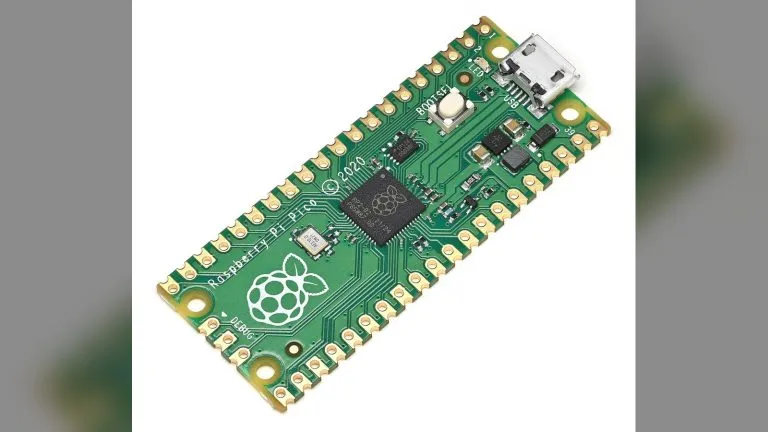
Raspberry Pi says the build used a Raspberry Pi 5 with 2GB of RAM. That is the entry-level Pi 5, and the choice makes sense for this project. The Pi never loads the game’s assets, physics or AI. Its job is to decode a video stream and send controller input back to the console, and the cheapest Pi 5 is enough for that.
According to the guide, the finished setup boots straight into Greenlight and shows a mirrored view of the Xbox console. Raspberry Pi lists three setup steps:
- Turn on Remote Play on the Xbox.
- Link Greenlight to your Microsoft account through microsoft.com/link.
- Click Start Stream in Greenlight.
The Adafruit blog summarized the Raspberry Pi guide in a post dated November 27 and states the limit directly: you can’t play GTA VI on a Pi itself, but you can remote-play it from an Xbox using a Pi and Greenlight. Raspberry Pi’s own description agrees. The Xbox does the game processing, and the Pi handles video streaming and controller input.
Greenlight itself is an open-source client for Xbox xCloud and Xbox home streaming. Its Flathub listing shows Linux builds, including aarch64. That is the 64-bit Arm architecture the Pi 5’s Cortex-A76 cores use, so you install a native Arm build on Raspberry Pi OS and do not need emulation or translation layers.
Some headlines got the story wrong. Titles like “Greenlight streams VI to Raspberry Pi 5,” or ones that mention “Playstation Portal,” can give the impression that GTA VI runs natively on a Pi or that Greenlight streams from a PlayStation. Neither is true. The Raspberry Pi guide and Adafruit’s post both show an Xbox streaming to the Pi. Greenlight is built for Xbox services, and the guide never mentions PlayStation.
What we don’t know yet
The facts we have contain no performance numbers. We have not seen resolution, frame rate or latency figures for Greenlight on a Pi 5, and nothing yet compares wired Ethernet with Wi-Fi for this setup. Until someone publishes measurements, any claim about how smooth it feels is a guess. Expect your home network to matter at least as much as the Pi.
We also do not have an official word from Rockstar on GTA VI and Remote Play. Search snippets we came across said Rockstar will support Remote Play on both PlayStation and Xbox, and that the Xbox host must be a Series X or Series S. We could not check either claim against an official Rockstar source, so treat them as unverified. Before you buy anything for this build, check your console against what Microsoft and Rockstar officially publish.
Our facts also do not show whether the guide covers xCloud cloud streaming of GTA VI. The tutorial streams from an Xbox in the home. Greenlight supports xCloud as a service, but that does not tell us whether the game is available there.
What it means
For makers, this is a cheap way to turn a spare screen into a second GTA VI station, as long as you already own the Xbox. A 2GB Pi 5 that boots straight into Greenlight works as a small dedicated streaming box. It suits a workshop, a bedroom TV or a desk display where you don’t want to move the console.
It is not a way to run a current AAA game on Arm single-board hardware. The Pi 5 is doing what it does well here: hardware video decode, USB and Bluetooth input, and running a Linux app from Flathub. All of the rendering happens on the console.
If you want the same thing from a PlayStation, Greenlight is the wrong tool. PlayStation remote play on a Pi has been done with a separate client called Chiaki, and Tom’s Hardware has previously covered an unofficial PS5 Remote Play setup for the Pi. That is a different project with different software, and it is not part of this Raspberry Pi guide.
There is one small oddity in Adafruit’s post. Its URL carries a #piday tag even though the post is dated November 27. It changes nothing about the guide, but it may explain some confusion if you see the story labeled as a Pi Day item.
If you build this, start with the steps Raspberry Pi published: turn on Remote Play on the Xbox, link through microsoft.com/link, and press Start Stream. Then test it on your own network before you rely on it. We’ll update this story if anyone publishes real performance numbers or if Rockstar confirms how Remote Play support works for GTA VI.
Follow every development in one place on our board release tracker.
Notes on this article
- Fact-checked by Hugo Lindgren before publication.
- Published
Fact-checking
- Every claim is checked by Hugo Lindgren; anything we cannot confirm is corrected, labelled or removed.