By Wren Calloway Fact-checked by Hugo Lindgren Published
BUILD
What it is
SecurePair is an Arduino library by Luca Soltoggio (GitHub: toggio) for cryptographically secure pairing and communication between ESP32 boards. According to the library’s Arduino Libraries index listing, which points to his GitHub repo, it can pair over a single standard LED using what it calls the LX.25 protocol, or over ESP-NOW or LoRa. Hackaday covered the project on 2026-10-05, and Adafruit’s blog followed on 2026-11-24 with a post titled “SecurePair: encrypted pairing between two ESP32 boards confirmed with an LED.”
How it works
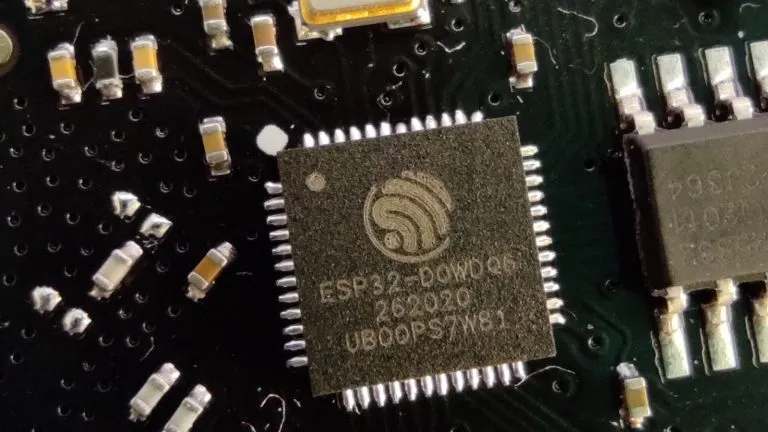
Boards. The project runs on ESP32 boards. Hackaday describes two boards exchanging data over visible light. It also notes that the design is not limited to two boards.
The LED trick. Hackaday explains that each board uses a single LED as both transmitter and receiver. This works because an LED can also act as a light-sensing diode. One component per board does both jobs, so you don’t need a separate photodiode.
Radios. The library listing says pairing can also run over ESP-NOW or LoRa instead of light.
The handshake. We have not checked these details against the README. They come from secondary summaries of the library listing, so treat them as reported:
- Key agreement. The two boards reportedly use X25519, an elliptic-curve method. It lets two devices arrive at the same shared secret without ever sending that secret over the link.
- Short-code check. Each board then reportedly displays a short code, either as a pattern on an LED, as colors on an RGB LED, or as digits. You compare the code on both boards. In schemes like this, the code is tied to the key exchange. If an attacker sat in the middle, the codes would not match, and the check depends on you, a human, looking at both boards.
- Encrypted messages. After pairing, messages reportedly use AES-256-GCM, which encrypts the data and also detects tampering. Replay protection reportedly stops an old captured message from being accepted a second time.
Reusing it. The listing also reportedly mentions:
- persistent identities, so boards remember each other
- up to 8 peers
- safe re-pairing
- pairing over one medium and then communicating over another
That last feature is the most useful one for your own projects. You could pair two boards by holding their LEDs together, then let them talk over ESP-NOW or LoRa. Please confirm these features in the README before you build around them.
Code. The source is on GitHub at github.com/toggio/SecurePair. The library is marked beta, licensed Apache 2.0, and listed at version 0.5.0, released 2026-10-03.
Parts list
We have not verified an exact parts list or cost. The examples use two ESP32 boards plus LEDs. The table below is our rough estimate, so check the GitHub README for specifics.
| Part | Role | Rough price (estimate) |
|---|---|---|
| ESP32 dev board (×2) | Runs SecurePair, does the crypto and messaging | ~$5–$15 each |
| Standard LED (×2, one per board) | Sends and receives light during pairing | Under $1 |
| Current-limiting resistors | Protect the LEDs and GPIO pins | Under $1 |
| RGB LED (optional) | Shows the short confirmation code as colors | ~$1 |
| LoRa modules (optional, ×2) | Longer-range link instead of light or ESP-NOW | ~$5–$15 each |
| Breadboard, jumper wires, USB cables | Wiring and programming | ~$5–$10 |
A basic two-board LED setup likely costs a few dollars to a few tens of dollars, depending on what you already own.
How to build your own
- Difficulty: Not stated by the maker. We’d guess beginner to intermediate if you follow the examples. Going beyond them means working with a beta API.
- Time: Not stated. With the parts on hand, an evening seems reasonable for getting the examples running.
- Skills: Using the Arduino IDE with ESP32 boards, basic LED wiring, and reading library examples. You don’t need to understand the crypto to use it, though it helps.
High-level steps:
- Set up the ESP32 board support in the Arduino IDE.
- Install SecurePair. It is in the Arduino Libraries index, or you can get it from github.com/toggio/SecurePair. Note the version, since it is beta.
- Read the README for the wiring. Follow its pin and resistor guidance rather than guessing, because the LED is used as a sensor too.
- Wire one LED to each board and flash the pairing example to both.
- Hold the boards so their LEDs face each other and start pairing.
- Compare the short code shown on both boards and confirm only if they match.
- Send test messages. Then try the reported option of pairing over light and talking over ESP-NOW or LoRa.
What we would change
These are wishes and questions from reading about the project. We have not built it ourselves.
- A documented parts and wiring sheet. A clear bill of materials with tested LED types and resistor values would make the build easier to repeat.
- Notes on ambient light. Light-based links can be sensitive to room lighting. A small shroud or a guide on distance and alignment would probably help first-timers.
- A clear comparison with built-in ESP-NOW encryption. Guides like Random Nerd Tutorials’ “ESP32: ESP-NOW Encrypted Messages” already cover encrypted ESP-NOW. A short explanation in the docs of what SecurePair’s out-of-band LED confirmation adds would help people choose.
- Version pinning advice. At 0.5.0 and marked beta, the API may change. If you build something lasting on it, lock to a specific release.
Credit
SecurePair is the work of Luca Soltoggio (toggio). The original write-up and source live on GitHub at github.com/toggio/SecurePair. Thanks also to Hackaday for its coverage of the visible-light build, and to the Adafruit blog for spotlighting it. We could only see the Adafruit post’s headline, not its contents. Artoo Maker Lab did not build this project; we’re just pointing you to it.
Notes on this article
- Fact-checked by Hugo Lindgren before publication.
- Published
Fact-checking
- Every claim is checked by Hugo Lindgren; anything we cannot confirm is corrected, labelled or removed.